
ChemDraw Pro 8.0: How to Get ChemDraw Legally in 2026 (and 6 Free Alternatives)
If you landed here searching for ChemDraw Pro 8.0, here’s what you need to know upfront: ChemDraw Pro 8.0 is a version from the early 2000s — it’s no longer sold, no longer supported, and won’t run properly on modern Windows or macOS. The good news: there are better ways to get ChemDraw today, including a free 15-day trial, free access through your university, and several genuinely free alternatives that produce publication-quality structures. This guide covers all of them.
Written by a physical chemist who has drawn thousands of structures for research papers and teaching material — every option below is one I’d actually recommend to my own students.
Quick answer
| 🧪 Your situation | ✅ Best option |
|---|---|
| University student / researcher | Check if your institution has a ChemDraw site license (free to you) |
| Want to try full ChemDraw | Free 15-day Signals ChemDraw trial from Revvity |
| Need free software long-term | KingDraw (mobile + PC) or ACD/ChemSketch (Windows) |
| Just need to draw in a browser | Ketcher or MarvinJS — no installation |
| Publication-quality on zero budget | ChemSketch or KingDraw with ACS style settings |
Why not just install ChemDraw Pro 8.0?
Three reasons. First, compatibility: Pro 8.0 predates modern operating systems and breaks on current Windows 11/macOS builds. Second, features: today’s ChemDraw includes name-to-structure conversion, NMR prediction, and biopolymer tools that didn’t exist two decades ago. Third — and worth saying plainly — the copies of old ChemDraw versions floating around the internet are unlicensed, frequently bundled with malware, and installing them puts your data and your institution’s network at risk. ChemistryDocs no longer links to or hosts software downloads; the options below are all legitimate and most are free.
How to get the real ChemDraw (legally)
1. Through your university — usually free for you
ChemDraw (now owned by Revvity Signals) operates site subscription licenses at hundreds of universities worldwide. Check the official Revvity Signals Site Subscription Gallery — search for your institution, register with your university email, and you can download and activate the current version at no cost. If your institution isn’t listed, ask your department or library; many licenses aren’t publicized internally.
2. Free 15-day trial
Revvity offers a no-cost 15-day trial of Signals ChemDraw — the cloud-connected edition that includes the desktop app. Enough time to finish a thesis figure set or a manuscript’s worth of schemes. Note: individual trials are only offered for Signals ChemDraw, not for Prime/Professional separately, and recent ChemDraw versions also allow 10 free launches before activation.
3. Buy a license
For ongoing personal use, ChemDraw Prime (drawing essentials) and ChemDraw Professional (adds name↔structure, property/NMR prediction) are sold as annual subscriptions on Revvity’s store. If you only draw occasionally, run the numbers against the free tools below first — for most students, they’re enough.
6 genuinely free ChemDraw alternatives (tested)
- KingDraw — best overall free option. Full-featured editor for Android, iOS, and Windows PC with cloud sync between devices. Handles IUPAC name↔structure conversion, 3D viewing, property prediction, and exports to .cdx, .mol, and SMILES — so files stay compatible with ChemDraw users. Supports ACS 1996 drawing style for publications.
- ACD/ChemSketch (Freeware) — closest desktop feel to classic ChemDraw. Free for personal and academic use from ACD/Labs. Draws organics, organometallics, and polymers; calculates molecular properties; names structures up to 50 atoms. Windows only.
- Ketcher — best browser-based editor. Open-source (Apache 2.0), runs entirely in your browser with nothing to install, exports MOL/SMILES/SVG. Ideal for quick structures on any device, including lab computers where you can’t install software.
- MarvinSketch (ChemAxon) — best for advanced academic users. Professional-grade editor; ChemAxon offers free academic licensing. Excellent stereochemistry handling and file format support — MarvinJS is the same engine used inside databases like Reaxys.
- BIOVIA Draw — free for academic and non-commercial use (registration required). The successor to ISIS/Draw; strong for reaction schemes.
- Avogadro — not a 2D scheme editor, but the free tool for 3D structure building, visualization, and geometry cleanup. Pairs well with any 2D editor above.
(Honorable mention: ChemDoodle — not free, but at student pricing it’s a fraction of ChemDraw’s cost and runs on Mac/Windows/Linux.)
Which should you choose? Our recommendation
For most students and researchers reading this from a university: check the site license gallery first — you may already have full ChemDraw for free. If not: KingDraw for daily work across your phone and PC, Ketcher when you just need a quick structure in a browser, and ChemSketch if you want a traditional desktop program on Windows. All three produce structures accepted by journals when you apply ACS style settings — we’ve published with them.
→ Full comparison with screenshots: [Best Free Chemistry Drawing Software Compared (2026)] (internal link — create this page next; it’s the natural hub for all software queries)
How to make free tools produce publication-ready figures
Whichever editor you use, apply these settings for journal-standard output: ACS document style (bond length 14.4 pt, bond width 0.6 pt, Arial/Helvetica 10 pt atom labels), export as SVG or 300+ dpi PNG, and keep consistent bond angles at 120°. We maintain a step-by-step guide with the exact settings panel for each tool: [How to Draw Publication-Quality Chemical Structures — InfoChemist] (external link to infochemist.com explainer — create as part of the explainer calendar).
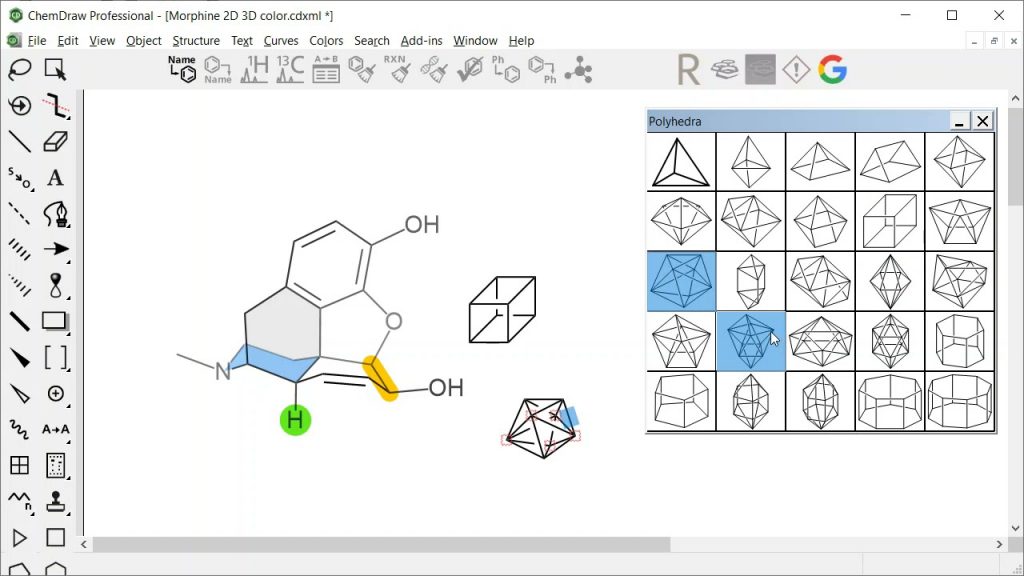
A look at the ChemDraw software usage
FAQ
Is ChemDraw Pro 8.0 still available?
No. It’s a discontinued version from the early 2000s. Revvity Signals sells current versions (ChemDraw Prime, Professional, and Signals ChemDraw) as subscriptions, with a 15-day trial available.
Is there a free full version of ChemDraw?
No legal free full version exists. Free access routes are: your university’s site license, the 15-day trial, and the 10-launch trial mode in recent versions. For permanently free software, use KingDraw, ChemSketch, or Ketcher — see the list above.
Is downloading a cracked ChemDraw safe?
No — beyond being illegal, cracked chemistry software installers are a common malware vector, and universities routinely block or flag them on institutional networks. The free alternatives above remove any reason to take that risk.
Can free tools really replace ChemDraw for a thesis or paper?
For 2D structures, schemes, and mechanisms — yes. Journals require correct, clear structures in standard style, not a specific software. ChemDraw’s advantages (NMR prediction, name conversion at scale, enterprise integration) matter mostly in industry workflows.
What do universities use?
Many rely on free tools; some have site licenses. If you’re preparing for a chemistry career or postgraduate research, learning one free editor deeply is more valuable than a cracked copy of an old version — skills transfer, licenses don’t. For more on building research skills, see [UOCS’s student resources] (external link to uocs.org).
📩 Get our free “Chemistry Software Starter Pack” — setup guides for KingDraw, ChemSketch & Ketcher with ACS-style settings, plus a structure-drawing cheat sheet. [Email opt-in form]
ChemDraw software supplements the chemists with a comprehensive set of easy-to-use tools for creating publication-ready, scientifically meaningful drawings of molecules and reactions at their comfort.
- Chemistry Software Guide: Legal Access & Free Alternatives
- Best-free-chemistry-drawing-software
- ChemDraw Ultra 12.0 and PerkinElmer ChemOffice 2020 – Version 20.0
- OriginPro 2022 v.9.9.0.225 (SR1)
- How to Draw Publication-Quality Chemical Structures
- student resources
Please Subscribe to our Email list and get notified of our latest uploads (Books, documents) and new updates. Email Subscription Box is provided on the sidebar (for PC) and on the bottom of this post (for Android Devices).
Kindly Like, Follow and Share our social media pages so that maximum people can get the benefit from this public service!
Facebook Instagram LinkedIn Twitter Pinterest
Happy reading!